Introduction
ASP.NET Navigation controls uses SiteMapPath control to retrieve the navigation information on the website. A SiteMap represent the relationship between the pages in an application. Site Maps Use the Provider Data model. This post explains about default XML Site Map provider, which enables you to store a Site Map in an XML file.
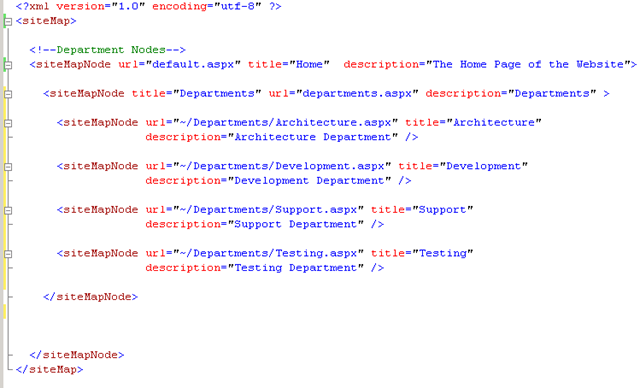
Site Map file contains <siteMpNode> elements. You declare a SiteMapPath control on page and it automatically uses the web.sitemap file located in the root directory.
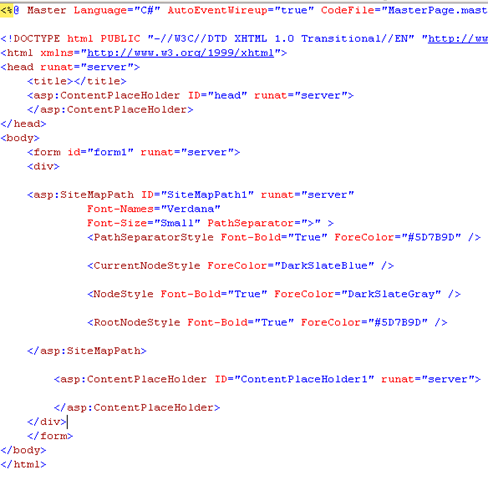
Add a sitepath control to your we page. You do not need to add to every page in your web site, If you add a SiteMapPath control to a master page then you can display the control automatically on every page.
Adding SiteMapPath control to Masterpage
Add a sitemap xml file to your root in website. The file named with web.sitemap. root is the default location where sitemappath control looks for this file.
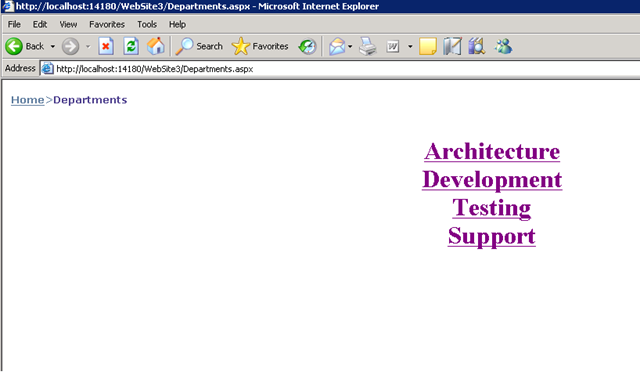
When you run the application you will see the following output
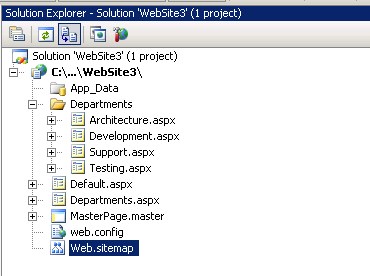
The solution structure for the project will look like
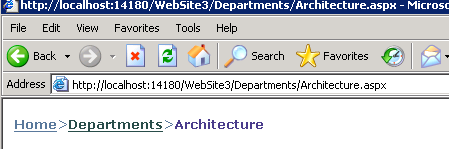
When you navigated to the Architecture department the site map looks like
Conclusion
In the next post I am going to explain about other navigation controls Menu,Tab and Tree View controls.
| Share this post : |  |
 |
 |
 |
 |
 |
 |
 |
 |
 |
 |
 |
 |


this post provides me a gr8 help…
thanks buddy…
Very helpful site ref by namrata , I love you
If you have any website and you want to maintain your reputation or you want to make your unique identity on internet world then you can contact with us we help you to make your website and we help you to make your unique identity. Our SEO team helps you to increase the ranking of your website or maintain your website on the top of the Google. We have the best team in our company with great experience. We are always ready to help you and support you in your business.