This post explains how TDD can be implemented in C# using NUNIT.
You can read the Introduction TDD to get an idea on TDD.
Nunit is a open source framework to for .NET which helps you to automate the unit testing. Nunit can downloaded from the Nunit site. current version is 2.5.
Nunit provides two utilities for running the automated tests
nunit-gui.exe – GUI toolnunit-console.exe – Command line tool
Using Nunit in Visual studio .NET Project
To implement the TDD we need to write
- Test cases
- program that is having test cases to run against it
Behavior of the Person C# class that we are going to write test cases
The Behavior can be described as follows
- A Person has properties age,full name and cash balance.
- When instantiating a person we should able to provide a first name, last name and age.
- The person full name property should return first name and last name with a space in-between.
- When you are creating person object cash balance should be 20000.
- The cash balance should be reduced by the amount he with draws.
From the Above behavior we can formulate a number of test cases example
- If we create a person with first and last name of “Kalyan†and “Bandarupalli†, and age 27, the person’s full name should not be †Kalyan Heroâ€.
- The person full name should be “Kalyan Bandarupalliâ€.
- The person’s age should be 27.
- Before withdrawing money the person’s cash balance should be 20000.
- After withdrawing 10000 cash, the person’s cash balance should be 10000.
We can implement the above test case in code[C#] using Nunit. To create a test case in your application create a class having the [TextFixture] attribute.
This class will contain test to test the methods,operations and values in Person class.
When you add the [TextFixture] attribute it means that class can have testcases to run under Nunit
Sample class the contains the above test case methods
using NUnit.Framework;
[TestFixture]
public class PersonTestClass
{
Person pTest;
public PersonTestClass()
{
//
// TODO: Add constructor logic here
//
}
[SetUp] // This method will executed before any other test method executes
public void Init()
{
pTest = new Person("Kalyan", "Bandarupalli", 27);
}
[Test] //Telling Nunit it is testable method
public void IsNameKalyanBandarupalli()
{
Assert.IsTrue("Kalyan Bandarupalli" == pTest.FullName);
}
[Test] //Telling Nunit it is testable method
public void IsAgeEqual()
{
Assert.AreEqual(27, pTest.Age);
}
[Test] //Telling Nunit it is testable method
public void BalanceBeforeWithDraw()
{
Assert.AreEqual(20000, pTest.CashBalance);
}
[Test] //Telling Nunit it is testable method
public void BalanceAfterWithDraw()
{
pTest.WithDraw(10000);
Assert.AreEqual(10000, pTest.CashBalance);
}
}
//Person Class
class Person
{
//Variable Declarations
string strFName;
string strLName;
int iAge;
float fcash;
Person()
{
strFName = "";
strLName = "";
iAge = 0;
fcash = 0;
}
public Person(string pstrFName, string pstrLName, int piAge)
{
strFName = pstrFName;
strLName = pstrLName;
iAge = piAge;
fcash = 20000;
}
public int Age
{
get { return iAge; }
}
public string FullName
{
get { return strFName + " " + strLName; }
}
public float CashBalance
{
get { return fcash; }
}
public void WithDraw(float fCost)
{
fcash = fcash – fCost;
}
}
}
Build the assembly and run the test cases using Nunit
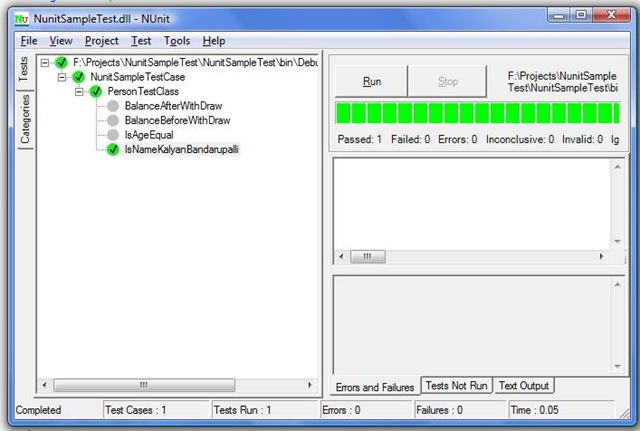
To do this launch the Nunit GUI tool , go to the File menu and select open. Next browse the assembly which we created above. This will then load the test cases in the Nunit-Gui tool, we can click Run button to begin the test cases. All test cases should pass as shown in the screen shot below.
Conclusion: In this post we had a look at TDD,unit testing and Nunit to implement the testcases.Unit testing here we discussed is for class libraries that developed using C#. It does not designed to test UI elements of the ASP.NET application. There is a tool named NunitASP designed to write unit test cases for ASP.NET application.


Can we debug test case which are been selected?
Congrats on your post!
Although I have been using NUnit for automated testing, I personally consider that there’s still too much couplement between the unit tests (that you also have to implement, compile, and mantain…) vs the original code. Too much steps.
I prefer to build (if possible) SOA applications and use test techniques such as these http://jordi-montana.blogspot.com.es/2012/03/testing-wcf-restful-services-with-post.html
where the are no code involved in testing, only expected vs real responses. I think this is a much easier and faster methods ( supposing that you can use SOA as you arquitecture, but hey!
UI is still the hardest, less testable, (there are tools like nunitASP but they dont support Javascript…). of every app. But with the above you can save automated testing time in your database & business process layers…
Thanks for sharing! 🙂